Gunicorn Worker는 도대체 몇 개를 설정해야 하는 거야? - Gunicorn에 대한 고찰
들어가는 글 🙋♀️
파이썬 웹 프레임워크(Django, Flask) 등으로 웹 어플리케이션을 개발한다면, Gunicorn라는 용어를 한 번은 들어보게 된다. 도대체 Gunicorn이라는 것은 무엇인지, 실제 Gunicorn을 사용하는 이유와 사용하는 데에 있어 고려해야 하는 점을 이번 포스팅을 통해 정리하고자 한다.
Gunicorn에 대해서 🔍
🔶Gunicorn이란?
Gunicorn은 _Green Unicorn_의 약자로(발음은 구니콘 또는 _지유니콘_이라고 한다. 외국에서도 두 가지로 다 불린다.) 파이썬 웹 서버인 WSGI(Web Server Gateway Interface)서버이다. 안정적이며 효율적인 웹 어플리케이션 배포를 위해 사용한다.
✅ WSGI(Web Server Gateway Interface)의 정의
여기서 WSGI(Web Server Gateway Interface)란 무엇인가? 다음의 위키 내용을 참고하자.
plain웹 서버 게이트웨이 인터페이스(WSGI, Web Server Gateway Interface)는 웹서버와 웹 애플리케이션의 인터페이스를
위한 파이썬 프레임워크다. - wikipedia
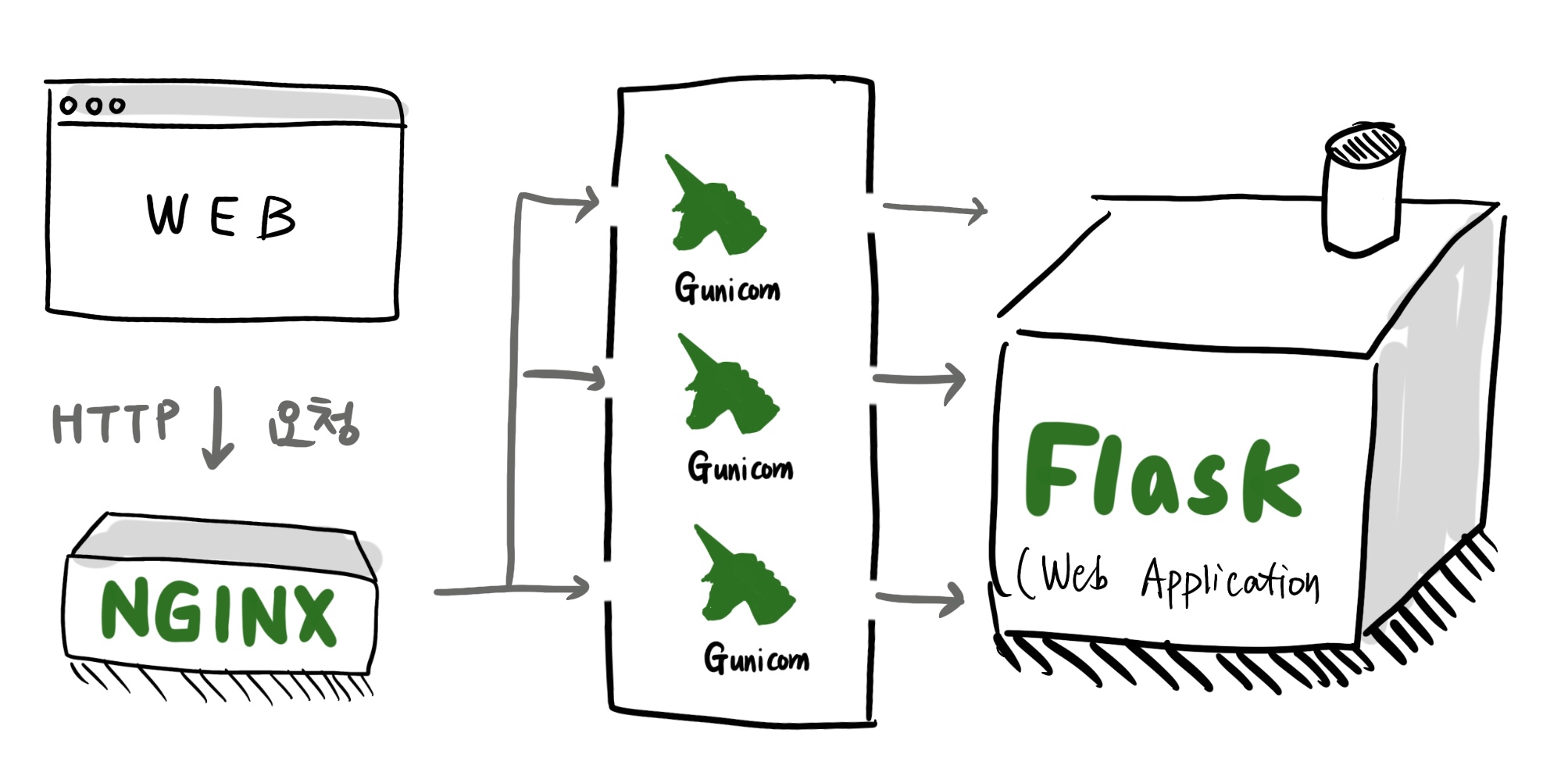
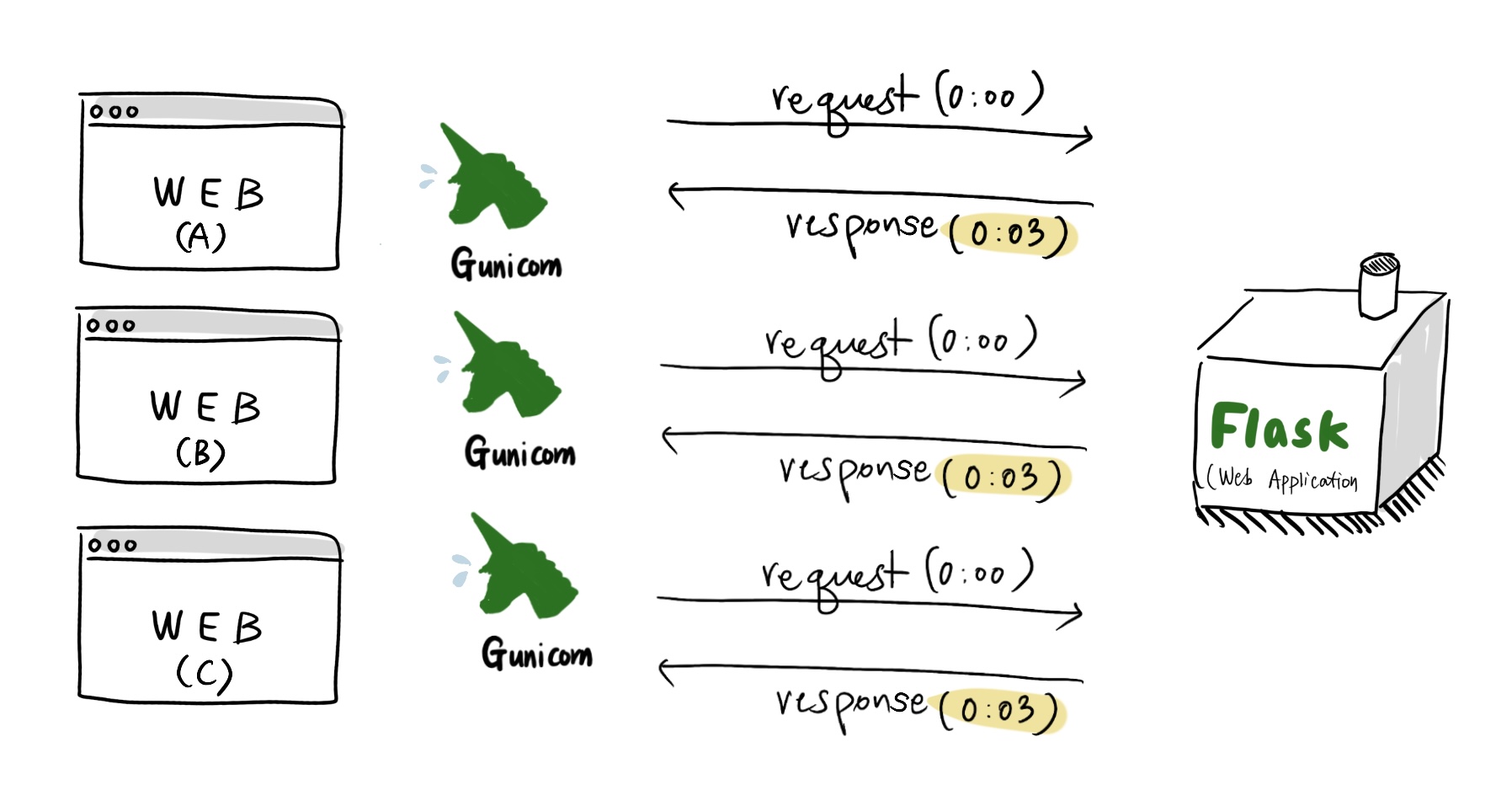
WSGI는 웹 서버와 웹 어플리케이션을 연결해주는 하나의 '프레임워크'이고, Gunicorn은 그 중 하나이다. Gunicorn은 워커 프로세스라는 개념에 입각하여 다중 프로세스 아키텍처를 표방한다. 이는 Gunicorn을 사용했을 시 높은 수준의 동시성과 뛰어난 처리 능력을 제공하며, 대규모 트래픽에도 효과적으로 대응하여 어플리케이션의 성능과 안정성을 향상시킨다.
그렇다면 여기서, 웹 서버와 웹 어플리케이션의 의미는 무엇인가? 간략하게 설명하기 위해 하단에 정리하였다.
- WSGI의 예시로
uWSGI,Waitress도 있으나,gunicorn이 가장 대중적으로 사용된다.
✅ 웹 서버란?
plain웹 브라우저와 같은 클라이언트로부터 HTTP 요청을 받아들이고, HTML 문서와 같은 웹 페이지를 반환하는 컴퓨터 프로그램
- wikipedia
위의 대표적인 예로 Nginx, Apache가 있다.
✅ 웹 어플리케이션이란?
plain인터넷이나 인트라넷을 통해 웹 브라우저에서 이용할 수 있는 응용 프로그램이다. - wikipedia
쉽게 말하자면, 우리가 일반적으로 만드는 API 서버가 웹 어플리케이션에 해당한다고 볼 수 있다.
위처럼 각 요소들의 정의를 말로만 설명하자니 조금 의미가 와닿지 않는 것 같다. 따라서 이를 그림으로 표현하면 다음과 같이 정리가 가능하다.
Gunicorn은 왜 써야 할까?🤔
위에서 서술했듯이 Gunicorn은
다중 프로세스 아키텍처
로서, 동시성 또는 병렬성을 위해 쓴다.
Flask나 Django 같은 파이썬 웹 어플리케이션은 실제 실행할 때는
plain단일 프로세스
로 돌아간다. 이는 한 번의 요청이 있으면 응답이 있기까지 하나의 흐름으로만 서버가 돌아간다는 얘기다.
한 번의 요청에 3초 정도 수행되는 기능을 웹 어플리케이션에서 실행한다고 하자. 그럼 대략 다음과 같이 표현이 된다.

위의 경우에는 동시에 요청이 들어오면 문제가 생길 수 있다.
위의 서버에 동시에 3명의 사용자가 한 번에 요청을 보낸다고 하자. 모든 사용자가 응답을 받기까지 얼마나 많은 시간이 걸리는가?
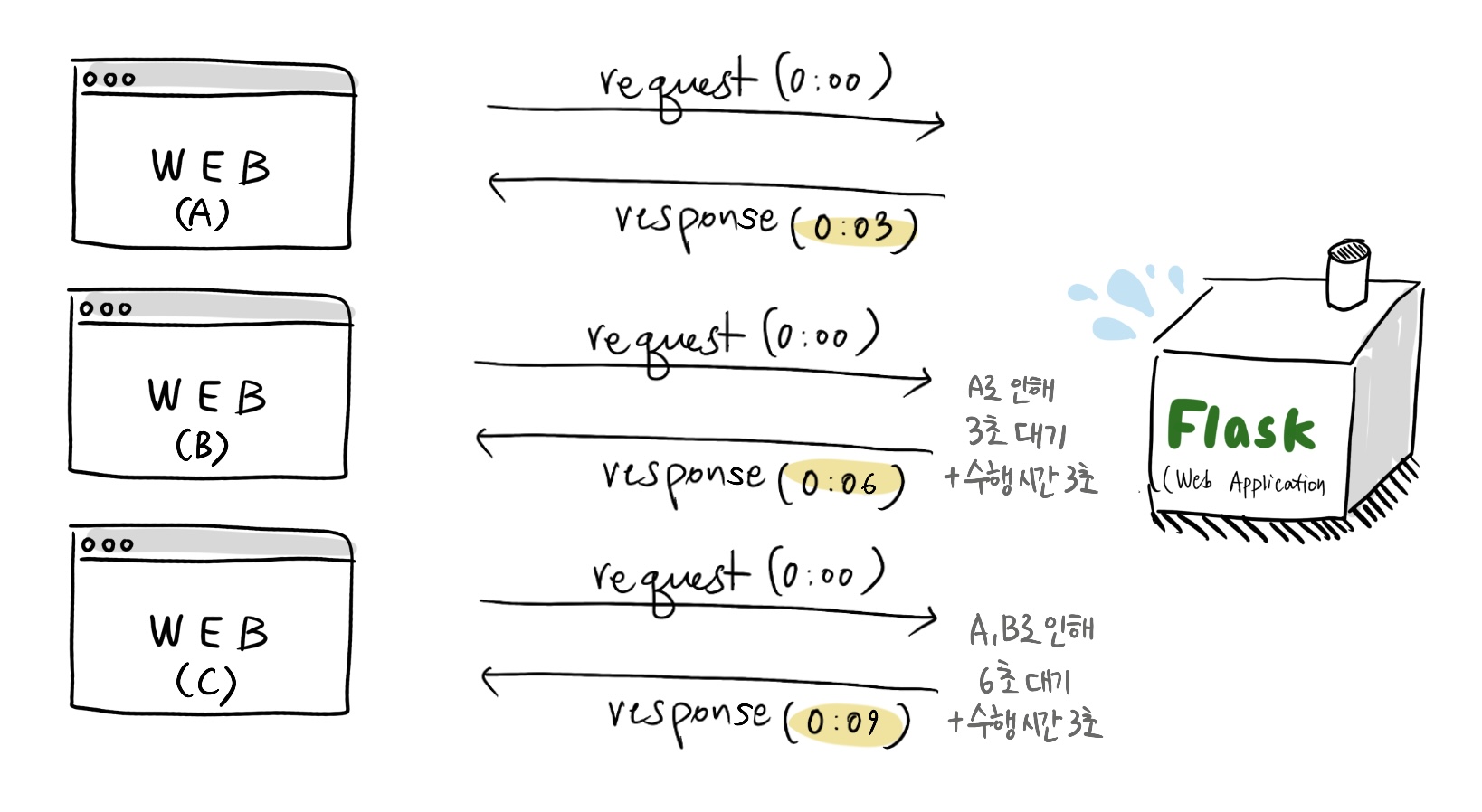
위 그림처럼 WEB C 사용자는 타 요청에 의해 때문에 9초만에 응답을 받게 된다.
이는 결국, 단일 프로세스 서버는 사용자가 많아질수록 처리해야 할 일이 밀리면서 서비스 사용에 있어 불편함을 초래할 가능성이 생긴다.
이를 위해 Gunicorn을 설정하여 다중 프로세스로 서버가 돌 수 있게 만들어 병렬 처리를 하게 함으로써, 서버가 안정적으로 기능 수행이 되어 사용자의 불편함을 줄이도록 한다.
Flask 서버에서 Gunicorn 설정 방법
Flask 어플리케이션을 Gunicorn으로 실행하기 위해서는 다음과 같은 순서로 실행하면 된다.
- pip로 Gunicorn을 설치
shell# shell
pip install gunicorn
- Flask 어플리케이션을 다음의 gunicorn 명령어로 실행
python# test.py
from flask import Flask
def create_app():
    app = Flask(__name__)

   	# app 실행을 위한 여러가지 동작들
    @app.route('/')
    def home():
        return 'Hello, World!'

    return app
shellgunicorn -b "0.0.0.0:5000" "test:create_app()"
http://localhost:5000의 ip 및 port로 어플리케이션을 실행한다는 의미다.
위와 같이 설정하면 워커는 무조건 1개이기 때문에, -w 옵션으로 워커 개수를 조절하여 실행하면 병렬성을 실현할 수 있다.
shellgunicorn -w 4 -b "0.0.0.0:5000" "test:create_app()"
Gunicorn worker 개수 결정 방법 📂
📍 준비 과정: 환경 변수로 워커 개수 설정을 미리 정해보자
만약 shell script로 실행을 한다고 하면 다음과 같이 환경 변수로 정할 수 있다. run_server.sh라는 이름의 파일을 생성하여 다음과 같이 작성한다.
plain#!/bin/bash

export GUNICORN_WORKERS=4  -- 워커 개수 설정

# Gunicorn 실행
gunicorn -w $GUNICORN_WORKERS your_app_module:app  -- 환경 변수로 설정한 개수만큼
- 위와 같이 설정했을 때, 쿠버네티스 환경에서 실행 테스트를 할 때, yaml 파일의 환경 변수를 조절하며 파드 실행 테스트하기가 용이해진다.
워커 개수를 조절하는 데에 있어서는 얼마나 많은 응답을 얼마나 빠르게 잘 수행하는가에 초점을 맞춰야 한다. 따라서 다음을 따른다.
📍 Gunicorn 워커 개수 설정 기준 1: 서버의 사양에 기반한다.
Gunicorn은 기본적으로 2개의 Worker를 사용한다. 단 gunicorn 공식 문서에서 권장하는 개수는 서버 코어 당 2~4개로 정의하고 있다.
plainThis number should generally be between 2-4 workers per core in the server. Check the FAQ for
ideas on tuning this parameter.
즉, 배포 서버의 기본적인 사양(코어 개수)을 미리 고민하여 기본적으로 워커 개수를 설정하면 된다.
plain공식문서에 의해, 8코어 서버에 웹 어플리케이션을 배포하는 경우에는 gunicorn 개수를 12~32개로 설정한다.
📍 Gunicorn 워커 개수 설정 기준 2: 트래픽 및 응답 시간에 대한 실험을 한 후 결정한다.
트래픽 분석, 응답 시간 테스트 등을 고려하여 워커 개수를 설정하는 단계다. 온 서비스 단계가 아니라면 서버 성능 부하 테스트를 통해 미리 워커 개수를 설정해볼 수 있다.
다음의 단계를 순차적으로 밟으며 간단하게 테스트를 한다.
- 기본 워커 개수를 설정한다.
- 트래픽과 성능을 모니터링하여 가장 효과적인 worker의 개수를 찾는다.
- 트래픽 및 응답 시간을 체크하기 위해 가장 널리 사용하는 툴은
jmeter이다. 이에 대한 내용은 추후 정리하여 링크할 예정.
마치며 🦄
Gunicorn은 파이썬 웹 프레임워크를 사용함에 있어서, 필수 불가결한 WSGI라고 할 수 있다. 웹 어플리케이션의 단일 프로세싱에 의해 성능 저하가 있는 부분을 안정화하여 효율적인 웹 어플리케이션 배포를 도와준다.
이에 정확한 설정과 적절한 워커 개수를 선택함으로써, 대규모 트래픽에도 무난하게 대응할 수 있도록 미리 측정할 수 있다.