파이썬 패키지 의존성 관리는 Poetry로!
아니 이렇게 쉽게 관리할 수 있다고? (이제 앎)

들어가는 글 🙋♀️
파이썬 패키지를 관리하는 데에 있어서 pip의 불편한 점을 체감하기 시작했다. pip로 패키지를 설치하는 것은 어렵지 않았지만, requirements.txt를 쓸 때 각 패키지 간의 의존성 관리를 파악할 수 없다는 점에서 패키지의 관리가 어려워졌다. 그래서 패키지 관리를 위한 패키지(?)를 확인하기 시작했다. pipreqs, pipdeptree 등의 패키지를 조사했으나 각각은 내가 겪고 있는 사항들을 해소하기 어려웠다.
그러다가 poetry라는 툴을 알게 되었다. 파이썬의 가상환경을 제공하는 동시에 패키지 의존성 관리가 쉽다는 점에서 파이썬 프로젝트를 하는 한 이미 많이 쓰이고 있었다. 이번 글에서는 poetry를 직접 설치/사용해보고 느낀 점을 정리해본다.
Poetry 시작해보기 🛫
현 시점(2024.9.18 기준)에서 poetry를 설치하려면 python 3.8+ 이상의 환경에서 설치해야 한다.
윈도우에서의 설치 방법은 다음과 같다.
windows 환경에서
공식 docs의 이 페이지를 참고하였다. 1) Install Poetry > 3) Add Poetry to your PATH > 4) Use Poetry (2번 단계는 건너 뜀) 순으로 진행하였다.
MacOS 환경에서
brew로 쉽게 설치가 가능하다
brew install poetry
Poetry 사용해보기 🕵️
🔸Poetry 프로젝트 시작
다음의 명령어로 poetry 프로젝트를 시작할 수 있다.
shellpoetry init
다음의 option을 shell에서 순차적으로 작성한다. 아무 내용을 쓰지 않으면 대괄호 안에 안내되어 있는 default 값으로 임시 설정된다.
shellPackage name [test]:  lets-do-poetry
Version [0.1.0]:
Description []:  test for poetry
Author [Your Name <you@example.com>, n to skip]:  n
License []:
Compatible Python versions [^3.8]:
다음과 같이 pypoetry.toml이라는 파일이 생긴다.
toml[tool.poetry]
name = "lets-do-poetry"
version = "0.1.0"
description = "test for poetry"
authors = ["Your Name <you@example.com>"]
readme = "README.md"

[tool.poetry.dependencies]
python = "3.8.5"

[build-system]
requires = ["poetry-core"]
build-backend = "poetry.core.masonry.api"
🔸가상 환경 사용
poetry init을 하면 기본적으로 설정한대로의 가상환경이 생긴다. 다음의 명령어를 치면,
poetry env list
위의 예시에서 설정했던대로, lets-do-poetry라는 이름의 프로젝트와 3.8.5의 파이썬 버전의 가상환경이 생긴다.
shelllets-do-poetry-Bsf-ihqJ-py3.8 (Activated) # 해시와 함께 버전이 명시된 가상환경이 생김
💡 poetry에서 사용하는 가상환경은 기본적으로 virtualenv이다. 이를 pyenv나 anaconda로 변경해서 사용하는 방법도 있다고 한다. poetry config 설정을 변경해주면 된다. 추후에 정리
가상환경을 activate하는 방법은 다음과 같다.
poetry shell
🔸가상환경에서 명령어 실행하기
이미 poetry shell을 이용해 activate한 가상환경이 있다면, 일반적으로 쓰듯이 명령어를 치면 된다.
- 예)
python test.py
그렇지 않고, 가상환경이 activate하지 않은 상태에서 실행하고 싶다면, poetry run python test.py를 실행한다.
🔸패키지 추가
poetry add flask
패키지 설치 시 위의 명령어로 설치가 가능하다.
- PyPI에 등록된 패키지 뿐만 아니라 github 소스, locally 사용하는 패키지 등으로 패키지 설치가 가능하다.
- 버전 또는 git revision을 명시할 수 있다 ex)
flask@2.1.0,github_url#develop - (정보) poetry에서 가능하다고 제시한 package form
- A single name (requests): this will search for matches on PyPI
- A name and a constraint (requests@^2.23.0)
- A git url (git+https://github.com/python-poetry/poetry.git)
- A git url with a revision (git+https://github.com/python-poetry/poetry.git#develop)
- A file path (../my-package/my-package.whl)
- A directory (../my-package/)
- A url (https://example.com/packages/my-package-0.1.0.tar.gz)
만약, dev 환경에서만 패키지 설치가 필요하면 --dev 사용하면 된다.
poetry add --dev pytest
처음으로 패키지를 add하면 poetry.lock이라는 파일이 생긴다. 이 파일을 통해 각 패키지의 의존성이 관리된다.
🔸패키지 삭제
poetry remove flask
위의 명령어로 패키지 삭제를 할 수 있다. 삭제할 때 선택한 패키지 뿐만이 아니라 의존 패키지도 함께 삭제가 된다.
🔸패키지 목록 확인
위의 명령어를 사용하면 현재 가상환경에 설치된 패키지 목록을 확인할 수 있다. 만약 potery.lock과 비교하여 누락된 패키지가 있다면 빨간색으로 표기가 되기도 한다.poetry show
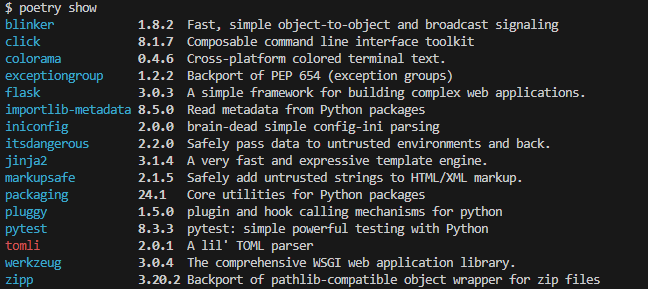
(위의 경우에는 tomli가 가상환경에서 지워진 것이다.)
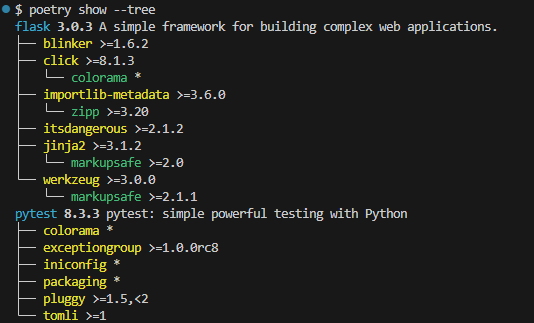
이들 간의 의존성을 파악하고, 해당 패키지들의 지원 버전을 확인하고 싶으면 --tree 옵션을 이용한다.
poetry show --tree
🔸가상환경에 패키지 설치
poetry.lock에 입각해서 패키지 설치하는 것은 poetry install이라는 명령어를 치면 된다.
🔸패키지 고정하기(lock)
poetry add, poetry remove으로 패키지 관리를 하면 자동으로 poetry.lock이 변경되지만, toml 파일을 직접 수정한 경우가 생겨 lock 파일과 차이가 생기면 다음의 명령어로 synchronize할 수 있다.
실제로 lock 파일과 toml 파일이 차이가 있는 채로poetry lock
poetry install을 시도하려고 하니 다음의 에러가 표출되었다.
🔸requirements.txt로 export하기
다행히도(?) poetry를 이용해서 requirements.txt로 추출도 가능하다. 다음의 명령어를 사용한다.
poetry export -f requirements.txt --output requirements.txt [--without-hashes]
-f: export할 파일의 포맷, 실제 공식 docs에서도requirements.txt만 지원한다고 한다.(default도 당연히requirements.txt이기 때문에 생략 가능)--output: 추출할 파일의 이름--without-hashes: 이 옵션을 쓰지 않으면 hash가 함께 포함된다.
개발용 패키지는 포함하려면 --with 옵션을 사용하면 된다.
poetry export -f requirements.txt --output requirements-dev.txt --with dev --without-hashes
사용해보니 어떤데? 🤔
가상환경을 따로 설정할 필요가 없다
그동안에는 프로젝트에 필요한 가상환경을 하나씩 만들어야 했다. 하지만 poetry에서는 그럴 필요가 전혀 없다. poetry 프로젝트를 initialize하면서 가상환경을 자동으로 생성해주기 때문이다. 이론적으로는 파이썬 버전을 자유도 있게 설정도 가능하다.
(다만, 실습하면서는 더 높은 파이썬 버전을 로컬에 설치해봐야 알 수 있어서 이 내용은 정리 안했다. 따로 시도해보겠다.)
의존성 파악과 관리가 쉽다
python 패키지 중 pipdeptree와 어떤 부분에서는 일맥상통한다. 하지만 pipdeptree는 그저 의존성 파악에만 중점을 두고 있는데 poetry로는 관리까지 쉽게 할 수 있다. poetry add/remove [package] 명령어를 이용할 때 의존 패키지도 알아서 관리가 되기 때문이다.
다만 기존에 쓰던 requirements를 마이그레이션 할 방법을 찾아야겠다.
이미 진행되고 있던 프로젝트의 패키지 의존성 파악을 위해서 poetry를 도입하고 싶지만, pip로 관리하고 있던 requirements.txt에서는 의존성 파악이 어렵다. 무엇이 정말로 프로젝트에서 사용하려던 패키지인지, 그저 의존성에 의해 함께 설치된 패키지인지 가려내는 것이 급선무다. 이것을 어떻게 마이그레이션 할지는 차후 시도해보고 포스팅하겠다.
마치며 🤗
패키지의 버전을 fix하면서 프로젝트 관리를 하는 것에 있어서 패키지 간 의존성에 대해 크게 고민 해보지 못했었다. 그러나 추후 deprecated 되는 경우가 존재할 수도 있고, 실제 프로젝트의 패키지 버전들이 너무 낮아 슬슬 버전 관리 고민을 하면서 꽤 막막했는데, 이미 좋은 툴이 나와 있어서 다행이란 생각이 들었다. 실무에서 사용하면서 생길 일들도 잘 follow up해서 지식 자산으로 잘 남겨봐야겠다.